Find tables and actions
Every automation starts with two questions: what do I look at? and what do I do about it? opslens answers both from two catalogs that ship with it, built from the plugin and library source and checked against the real thing, so nothing is guessed.
| Catalog | Answers | Size |
|---|---|---|
| Tables (Steampipe) | What can I query? Columns, types, descriptions, required filters, examples | 670 tables, five plugins |
| Pipelines (Flowpipe) | What can I do? Typed parameters, outputs, and whether it reads, notifies or changes | 443 pipelines, 15 library mods |
One search for both
opslens search "unattached ebs volumes older than 14 days, then open a jira ticket and post to teams"
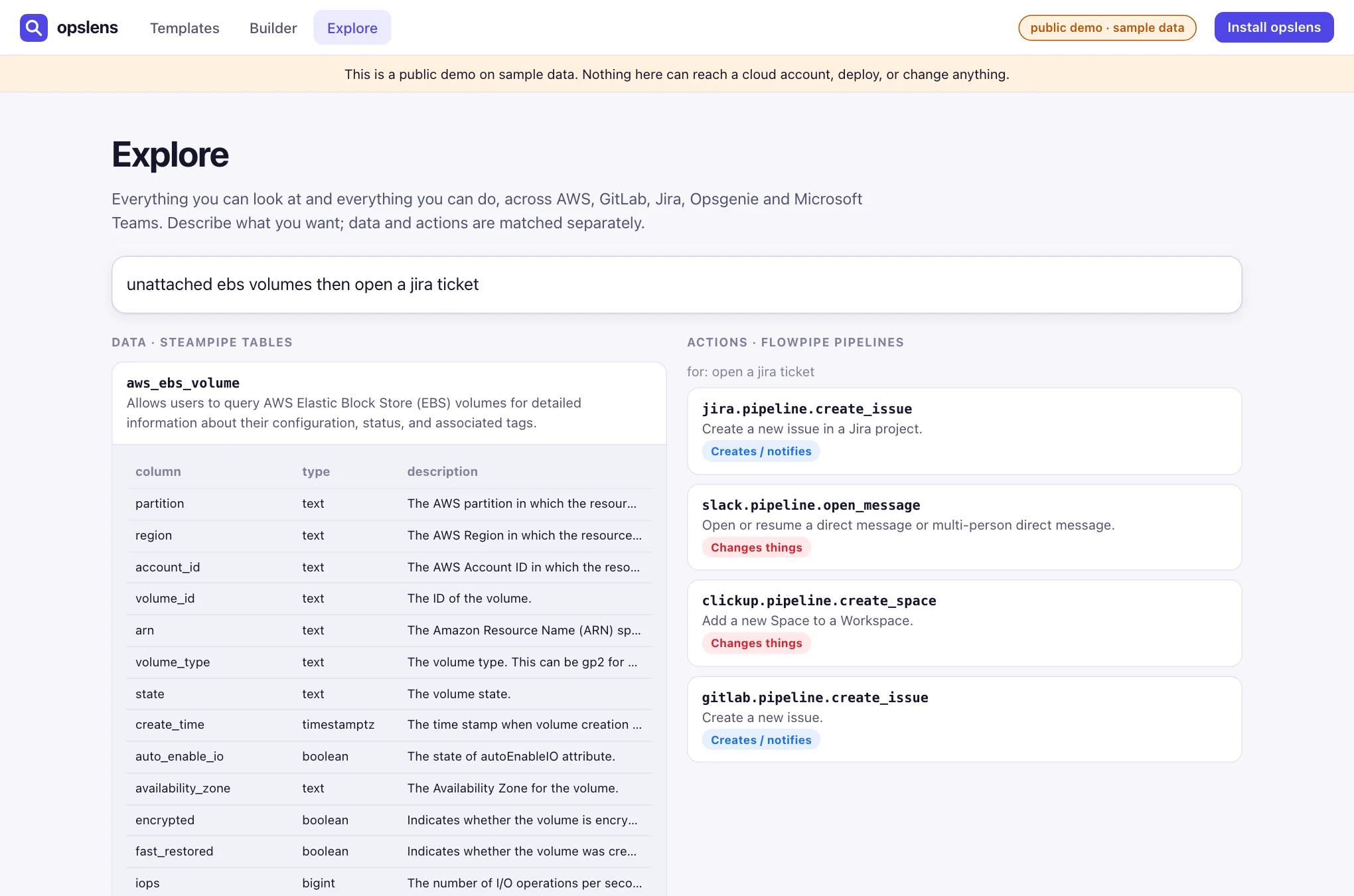
Your sentence is split at the "then": the first part is matched against data (tables), each later part against actions (pipelines). The output lists the best tables with their key columns and, for each clause, the pipelines that fit, each tagged read, notify or change.
The same search is in the app's Explore tab and at the top of every template gallery. It also runs entirely in your browser on the Explore page of this site, with nothing to install.
Narrow it down
opslens find tables unattached ebs volumes
opslens find tables jira issue --plugin jira
opslens find pipelines create jira issue
opslens find pipelines tag --mod aws --writes        # only actions that change things
opslens find pipelines list instances --reads        # only actions that just read
Look at one in detail
opslens describe table aws_ebs_volume            # columns, types, required filters, examples
opslens describe pipeline jira.create_issue      # typed params, outputs, steps, effect, a usage snippet
Table descriptions list which columns are cheap to filter on and which are required. For an API-backed table, filtering on the right columns is the difference between one call and thousands.
Try a query
opslens query --source demo "select volume_id, region, size from aws_ebs_volume where state = 'available'"
opslens query "select count(*) from aws_ebs_volume"          # live: needs Steampipe and credentials
Queries pass the safety guard first. --source demo uses bundled sample data, which takes the same Postgres SQL as the live service, so what you write on sample data runs unchanged on live data.
Why the effect tag matters
When you search for actions, each result carries one of three tags:
- read: only fetches data.
- notify: creates something additive (a ticket, an alert, a message). May run on its own.
- change: modifies or deletes. Always sits behind an approval.
A search for "delete" will show deletions; a search that doesn't mention deleting will not lead with them.
Keep the catalogs honest
opslens catalog stats                 # what is in the shipped catalogs
opslens catalog verify                # compare against your installed Steampipe plugins (no API calls)
verify catches the case where your installed plugin version differs from the one the catalog was built from. See The catalogs.