Preview and test
A preview answers the question you should ask before deploying anything: what would a run do right now? It reads, it shows, and it changes nothing.
On the command line
opslens preview generated/unattached_volume_cleanup --source demo     # sample data, no cloud needed
opslens preview generated/unattached_volume_cleanup                   # live: a read-only query through Steampipe
You get:
- how many rows the query found, and a sample of them;
- for every action, its effect (
read,notify,change), whether it runs automatically or after approval, how many times it would run, and the exact arguments of the first calls, with your{placeholders}filled in from real rows; - a closing line: how many state changes would be requested, and that 0 have been made.
--sample N sets how many calls are shown per action; --format json is for scripts.
In the app
The Test button in the builder does the same thing and lays it out as a table of rows followed by one card per action.
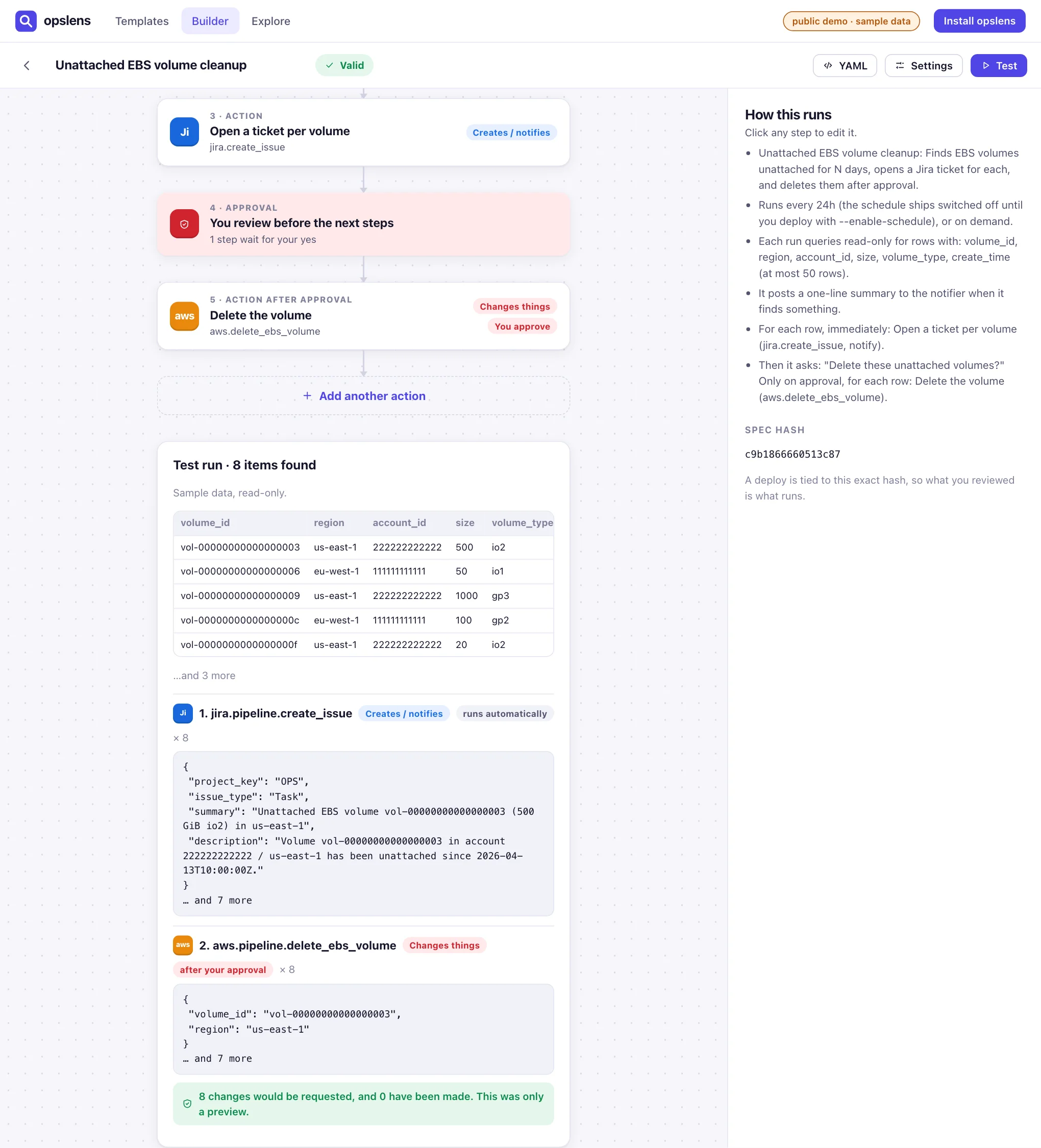
In the local app, Test on live data runs the read-only query against your real accounts. In the public demo, Test always uses sample data.
What "live" means, and what it doesn't
Live preview runs only the detect query, read-only, through the same guard as everything else, with a timeout and a row cap. The actions are rendered (so you can read the exact arguments) but never sent. A preview cannot create a ticket, send a message or change a resource, on live or sample data.
Using previews to review
Preview is most useful as a review step:
- Does the query find the right things? Read the rows. If an "unattached volume" is one you know is in use, fix the
WHEREclause now, not after a deploy. - Is the volume right? If 400 rows match and you expected 8, the preview tells you before 400 tickets exist.
detect.max_itemsis the backstop. - Do the messages read well? The first call of each action shows the final text, placeholders resolved.
- Does every change wait? Each
changeaction shows after approval.
In CI, opslens preview ... --source demo proves that every placeholder resolves against real column names without needing credentials.